
About Responziq: Digital Studio Manager
Greater availability, faster lead management and less work for the studio team
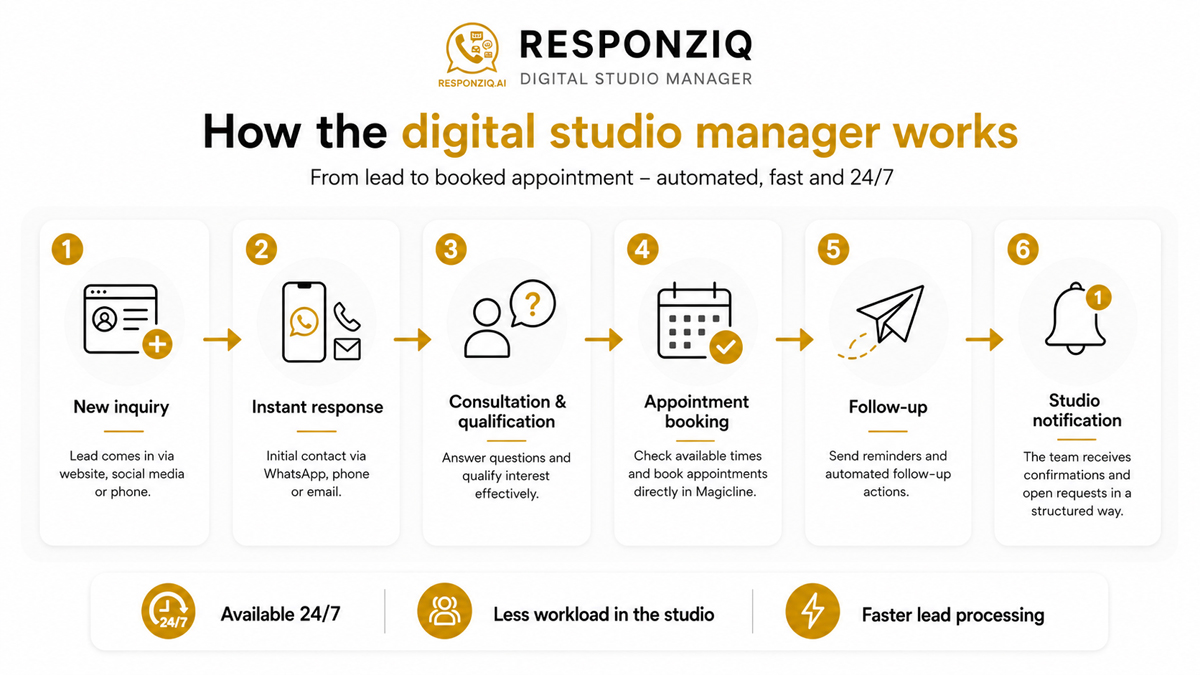
Responziq’s Digital Studio Manager handles recurring tasks in communication, appointment management and lead processing. It is available around the clock by phone, WhatsApp including voice and image messages, web chat and email.
Prospects and members receive immediate answers to questions about the studio, offers, campaigns and trial sessions. The Digital Studio Manager explains the training concept, asks targeted follow-up questions and guides prospects through to appointment booking.
Through the Magicline integration, available time slots can be checked and trial sessions booked directly. Depending on the permissions granted, existing appointments can also be rescheduled or cancelled. Confirmations, reminders and important information are sent automatically.
New leads from social media, websites, landing pages and other sources can be contacted immediately and followed up through individually defined workflows. Messages, calls, timing intervals and campaign-specific processes can be configured flexibly. Once an appointment has been booked or the studio team needs to take over, the workflow is automatically stopped or handed over.
WhatsApp voice messages are transcribed, understood and answered. Image messages can also be recognised and processed. Documents, images, forms, links and preparation instructions can be sent automatically as well.
Open requests are handed over to the studio team in a structured format, including contact details, conversation history and the next required step. Each Digital Studio Manager is tailored to the offers, opening hours, appointment rules, campaigns and workflows of the respective location.
The solution is suitable for EMS studios, fitness studios, personal training studios and other service providers with consultation-intensive offers. The range of functions can be configured to match individual requirements and expanded later.
Benefits for you
Available around the clock by phone, WhatsApp, web chat and email
New leads are contacted immediately and followed up consistently
Trial sessions can be booked directly in Magicline
Fewer interruptions and less manual work for the studio team
Faster response times for prospects and members
Consistent communication based on the studio’s guidelines
Open requests are handed over to the team in a structured way
Automated reminders reduce missed appointments and lost conversations
More booked appointments from existing lead sources
Individually adaptable to the offers, workflows and rules of each studio
Most relevant functionalities
- Communication
Answer incoming phone calls
Support prospects and members via WhatsApp
Handle inquiries by email
Transcribe and respond to WhatsApp voice messages
Enable multilingual communication
- Prospect consultation
Answer questions about training, offers and trial sessions
Explain training concepts clearly
Qualify prospects through targeted questions
Provide individual information about the respective location
- Magicline appointment management
Check available appointments in Magicline
Book trial sessions directly in Magicline
Send appointment confirmations automatically
Reschedule existing appointments depending on approval
Cancel existing appointments depending on approval
- Automated lead management
Receive new leads from Facebook and Instagram
Receive leads from websites and landing pages
Contact prospects immediately after an inquiry is received
Run individual WhatsApp workflows
Make automated phone calls
Send emails within defined workflows
Carry out multi-step follow-up sequences
Control contact attempts using freely definable time intervals
Use different workflows for different campaigns
- Reminders and follow-ups
Send appointment-related reminders
Contact prospects again if no appointment has been booked
Start follow-up actions when no response is received
Stop workflows automatically once an appointment has been booked
Exclude completed or unsuitable contacts from further messages
- Documents and information
Send PDF documents automatically
Share images and information materials
Send links to websites and videos
Provide preparation information for trial sessions
Share directions and location information
- Handover to the studio team
Identify open requests automatically
Send internal notifications by WhatsApp or email
Forward contact details and conversation summaries
Pass on callback requests in a structured way
Mark unresolved inquiries as concrete tasks
- Individual setup
Store the studio’s offers and services
Take opening hours and location information into account
Define appointment rules individually
Adapt communication style and wording
Set escalation rules for special requests
Support multiple locations with different workflows
Set up interface
Unfortunately, the integration of Responziq: Digital Studio Manager isn't available for gyms located in your country () and therefore cannot be activated in the Magicline.
Please make sure that your Magicline package supports the setup of one or multiple partner integrations in order to activate this interface.
You're not yet using Magicline? Simply start the free demo or let yourself be convinced of the benefits of Magicline in a personal conversation.
Select Responziq in the Magicline Marketplace and activate the integration.
Provide the studio information including contacts, locations, offers, opening hours, appointment types and frequently asked questions.
Define the workflows together including communication channels, appointment rules, lead sources, campaigns, follow-up processes and communication style.
Test and approve the setup. Responziq configures the channels, workflows and Magicline integration. After the joint test phase, the Digital Studio Manager is activated.
Note: The technical setup is handled by Responziq. The studio only provides the required information, access details and approvals.